
After the migration: managing internal changes, training, and adoption
It is often thought that a migration ends at go-live. In reality, this is where the true return on investment occurs. An ERP that is technically well-migrated but poorly adopted by teams does not improve anything: users bypass the system, revert to their old habits, and the value of the new version remains untapped.
The good news is that post-migration can be prepared - and it requires much less effort than one might fear. Here’s how e3k supports your teams for smooth adoption.
Why adoption is the most underestimated factor
In an ERP project, a lot of energy is put into the technical aspects: migrating modules, validating data, achieving go-live. All of this is necessary. But the factor that truly makes the difference between a successful migration and a disappointing one is user adoption.
An employee who continues to keep their numbers in a parallel Excel file, who does not use the available automations, or who is still looking for the old menu two weeks after go-live, is value left on the table. Occasional training is not enough: support needs to be designed for the first few weeks.
What concretely changes for your teams
Let's reassure right away: an upgrade is not a reimplementation. Your processes remain the same, your data follows, and the tool remains Odoo. What changes are mainly some interface and procedure details : a moved menu, a redesigned screen, a simplified step, a new feature that replaces a manual operation.
It is precisely because the changes are targeted that we do not have to relearn everything. We train on what is changing, not on what your teams already master.
Supplementary training: target the changes, not relearn everything
Between the opening of the second test database and the go-live, e3k organizes supplementary training. The idea: to show what is new and the changes in procedure, without redoing the entire initial training.
Priority to the most used modules
We focus the effort where it matters most. Accounting generally receives the most attention, because that is where procedural changes have the most impact. Other modules receive shorter training: finding the new menu, understanding a redesigned screen, adopting a new feature. The extent of the training adjusts to the size and complexity of your database.
Train an internal super-user
This is one of the most effective adoption levers. Rather than relying solely on external training, we can train a super-user in-house - a person who knows the tool well and becomes the go-to person for their colleagues on a daily basis.
This internal referent answers small questions on the spot, without the need to open a support ticket for every detail. He knows your business reality, is available immediately, and shares best practices within the team around Odoo.
For more complex cases, he also knows when to call on e3k as an integrator:
the user chain → referent → super-user → e3k avoids clogging up support for simple questions while keeping quick access to Odoo expertise when necessary.
Post-go-live follow-up: adjust what was not seen
Even with rigorous testing, there are always a few adjustments to be made once in production: a particular case that did not appear, a display preference, a report to refine. This is normal, and it is expected.
After go-live, e3k continues to support in addressing these points as they arise. It is this presence in the first weeks that transforms a correct start into successful adoption.
How much time to plan for internal teams
As with the migration itself, the effort required from your teams after go-live is measured. It essentially boils down to:
- Participate in supplementary training (a few hours, focused on accounting and key modules);
- Designate and free up some time for a super-user;
- Report adjustments in the first weeks of use.
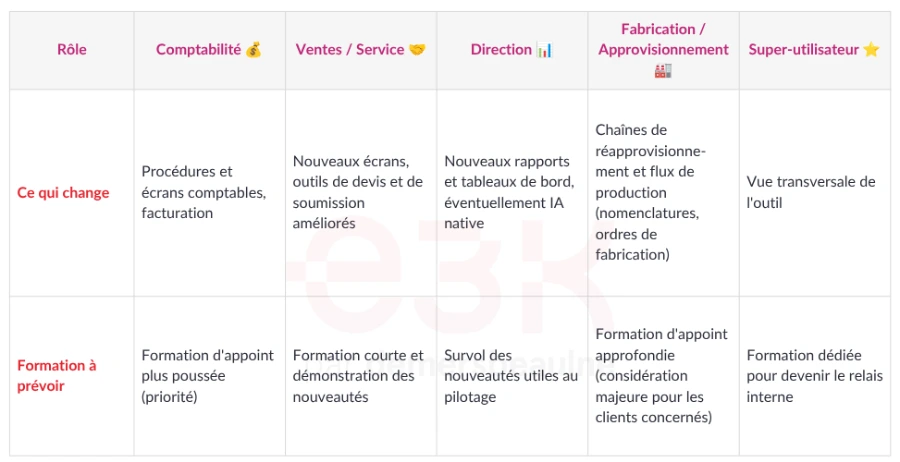
Here is what to expect, by major type of role:
Signs of an adoption that is going off track (and how to fix it)
Some signals are unmistakable and deserve a quick response. Beyond field observation, a few simple indicators help to objectify adoption: the proportion of active users in the system, the number of parallel Excel files still in circulation, or the share of a process actually completed end-to-end in the ERP rather than half outside.
The return to parallel Excel files. When an employee continues to maintain their own spreadsheets "on the side" of the ERP, it means something is not right: either they do not trust the tool, or they do not know how to do what they used to do before. The solution is rarely to force them, but to understand the blockage and resolve it through a short targeted training.
The multiplication of the same questions. If several people struggle with the same operation, it indicates a need for training, not an individual flaw. This is exactly where a well-identified super-user saves valuable time.
The circumvention of automations. Paying for a modern ERP and continuing to do manually what it could automate is leaving value on the table. A demonstration of the new features, after go-live, helps teams discover what the new version allows them to do.
Identifying referents by department
Beyond a single super-user, it is often useful to designate a referent by department - a close contact in each team (accounting, sales, operations). These referents know the specifics of their field, they relay specific needs and reassure their colleagues in the first weeks. It is a human network that complements the technical support of e3k and firmly establishes the new ways of doing things.
Change management, the key to a successful migration
Ultimately, succeeding in the post-migration phase is about change management. Supporting people, not just the tool. This is a principle we apply to all our implementations as well as our migrations, because a technology only has value if it is actually used.
To delve deeper into this topic, read our article: Change management: the key to a successful Odoo implementation. And to review the entire migration journey, consult our complete guide.
Frequently Asked Questions
Here are some frequently asked questions about how to successfully manage change.
The migration of an Odoo database to a recent version follows a structured process in several steps. It starts with an audit of the existing setup: custom modules, third-party integrations, online store, bank synchronization — everything that may require adaptation.
A test database is then created to simulate the migration without affecting production. It is at this stage that anomalies arise: module incompatibilities, data to clean, customizations to carry over to the new version.
Once the adjustments are validated, the switch to production is planned during a low operational risk window. Odoo automatically generates a backup before the upgrade. For SMEs with few customizations, the entire process can take less than 20 minutes on the platform.
Let's take the case of a Quebec SME in the manufacturing sector, which moved from Odoo 16 to Odoo 18 with e3k. The resistance to change was palpable from the start: end users feared losing their bearings, and some continued to maintain their own Excel files in parallel — a classic signal of a costly failure in the making.
The first concrete action was to designate two change ambassadors, one from each key department. These individuals were trained first, before the rest of the team, to become trusted liaisons in their service.
Clear communication about the objectives followed: time savings on double entry, better visibility on inventory, real-time financial reports. By naming tangible benefits rather than abstract ones, the fear of change gradually dissipated — and the adoption of the new system occurred without major disruption.
Change management generally relies on four main phases, which are found in most recognized methodologies, including that of Prosci (ADKAR model):
- Awareness : making it clear why the change is necessary — in the case of an Odoo migration, this means explaining the limitations of previous versions and the expected concrete gains.
- Desire and commitment : involve the teams early in the project to turn the constraint into a shared strategic priority.
- Training and skill development : equip each role according to its actual needs, without overloading users with concepts outside their scope.
- Anchoring in practices : measure adoption after go-live, correct gaps, and reinforce good habits so that the new tool becomes the norm in the organization.
For companies under Odoo Enterprise, this last step is often the longest — and the most decisive.
An Odoo integration journey generally follows five main phases. The first is needs analysis: mapping business processes, identifying the modules to activate, and defining the project scope — accounting, sales, manufacturing, or a more limited MVP scope to start quickly.
Next comes the configuration and setup of the environment, followed by a testing phase with key users to validate the flows before any deployment.
The production start marks the fourth key moment, ideally planned outside of a closing period or a busy fiscal year to limit risks. The fifth phase — often underestimated — is the post-launch support : this is where fine-tuning occurs and the tool becomes fully operational for the teams.
Start writing here ...