
ERP (PGI): What is it and why does your SME need it?
Five conflicting Excel files. Three software programs that don't communicate with each other. And double data entry that easily eats up five hours a week. If this sounds familiar, it means your processes are scattered everywhere.
The real problem? When information is spread across five different tools, no one has the true picture of what is happening. The result: you make decisions based on gut feeling instead of reliable data.
We will explain what an ERP is, without jargon, and why it's the game changer your SME has been waiting for.
What does ERP mean?
Definition and abbreviation of integrated management software
You will see, ERP and PGI are exactly the same thing. Just two ways to name the same tool that can transform your business daily operations. Here’s how to demystify it all.
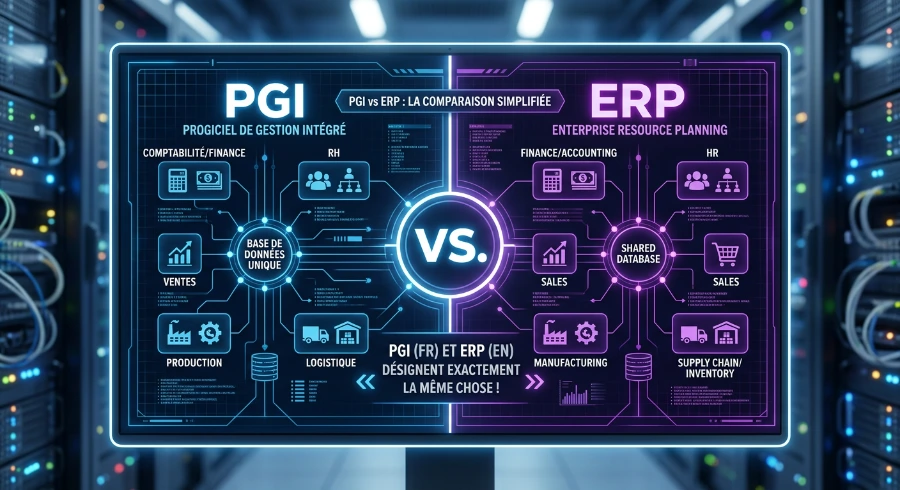
What is the difference between an ERP and a PGI?
Spoiler: there is none. It's like saying email or email — the same thing, two languages.
ERP comes from the English term Enterprise Resource Planning, while PGI is the French equivalent: integrated management software. Both refer to a software system that centralizes and coordinates all the processes of a company on a single platform.
In practical terms, it brings together your sales, inventory, accounting, human resources, CRM, and even your production if you have it. All of this communicates together instead of living in separate silos.
Why this dual naming? Simply because the concept originated in the United States in the 1990s, which is why the English term has become globally established. In Quebec, you will hear both, but ERP is far more dominant in the business world.
How does an integrated management system work on a daily basis?
Imagine asingle databasewhere all your information lives together. It's the heart of an ERP.
When a customer places an order, the system automatically updates your inventory, triggers a production order if necessary, generates the invoice, and records the accounting entry. All of this without anyone having to re-enter the information five times in five different software programs.
The interconnected module sare the key. Each department has its own space (Sales, Inventory, Accounting, HR), but these modules share the same data in real time. A change in one module is instantly reflected everywhere else.

Result: no more double entry errors, no more conflicting versions of the same number, and above all, you have a reliable overview to make your decisions. The dashboards show you at a glance your key indicators: monthly sales, inventory levels, pending invoices, performance by product.
What is ERP software in concrete terms?
Let's take the example of an auto parts distributor in Laval. Before the ERP, the team used three separate software programs: one for sales, an Excel spreadsheet for inventory, and another for accounting.
Before
The seller took an order, noted the information in his system, then sent an email to the inventory manager to check availability. The manager would consult his Excel, respond, and then manually update his file. Next, the accountant would receive a paper copy to create the invoice. Total: 45 minutes per order, with regular errors.
After the ERP
The seller enters the order into the system. The inventory updates automatically, the invoice is generated with one click, and the accounting is recorded instantly. Time: 3 minutes. Errors: almost none.
A modern ERP software like Odoo offers more than 82 integrated applications covering all the needs of a small to medium-sized business: from CRM to project management, including e-commerce and marketing. You choose the modules you need today and can add more as your business grows.
It's a single platform that replaces the jungle of disconnected software and finally gives you the true picture of your business.
How to leverage the basic features of an ERP?
The beauty of an ERP is its modularity. No need to implement everything at once or pay for features you will never use. You choose the modules that meet your current needs, and then you add the rest as your business grows.
Here are the four pillars found in most ERPs and how they transform your daily life.
1. Accounting and financial management
The accounting module is the heart of the system. It automates invoicing, tracks payments in real-time, and generates your financial reports without you having to juggle between three different software.
The real-time financial reports give you an instant view of your financial health. No more waiting until the end of the month to know where you stand. You can see your margins, cash flows, and accounts receivable at a glance, which completely changes your ability to make informed decisions.
2. Sales and customer relationship management
The integrated CRM module transforms your sales management. You centralize all your leads, track your sales pipeline, and keep a complete history of each customer in one place.
With an integrated CRM, your team knows exactly where each opportunity stands. A salesperson can see a customer's purchase history, their past interactions with customer service, and even their current balance before picking up the phone.
3. Inventory management and supply chain
The inventory management In real time, it's the module that prevents unpleasant surprises. You know exactly what you have, where it's stored, and when to restock.
With the Inventory module, you receive automatic restocking alerts based on your minimum levels and supplier lead times. The system tracks each item from the purchase order to the final shipment. Complete traceability even allows you to instantly find out which batch was used in which order, a major asset for quality and compliance.
4. Human resources and production
The HR module centralizes everything related to your employees: payroll, leave management, recruitment, performance evaluations, and training. No more juggling between your payroll software, your leave calendar, and your paper files.
Integration with accounting allows for automatic transfer of payroll data to your accounting entries. Managers approve leave directly in the system, and hours worked feed into payroll without manual re-entry.
Here is a summary table of the main ERP modules and their practical daily use:
| Module | Key function | Example of daily use |
|---|---|---|
| Accounting & Finance | Billing automation, payment tracking, real-time financial reports | Automatic bank reconciliation, live cash flow dashboards |
| Sales & CRM | Lead management, sales pipeline, centralized customer history | Tracking business opportunities, automated quotes, lead to customer conversion |
| Inventory & Stocks | Real-time tracking, restocking alerts, complete traceability | Avoid stockouts, manage multiple warehouses, track batches and series |
| Human Resources | Payroll, leave, recruitment, evaluations, training | Online leave approval, payroll → accounting integration, centralized employee files |
| Production | Manufacturing order planning, capacity management, quality control | Schedule production according to orders, manage raw material needs, trace quality defects |
What are the advantages and disadvantages of an ERP for SMEs?
Let's not kid ourselves: an ERP is a big deal. But before diving in, here’s the complete picture (not just the shiny side you see in brochures). Because yes, there are challenges. But the benefits far outweigh them when done right.
The concrete benefits for your organization
A well-implemented ERP transforms the way you run your SME. Here’s what it really changes.
First, the centralization of data. Gone are the days when your sales are in one file, your inventory in another, and your accounting in a third. Everything is consolidated into a single platform. The result: you see exactly what’s happening, in real-time, without searching through five different systems.
Next, the reduction of data entry errors. When a customer order enters the system, it automatically updates inventory, production, and billing. No more need to enter everything manually three times. Recent studies show that 78% of companies report an improvement in productivity after implementing an ERP.
The automation of time-consuming tasks frees up your teams. Friday afternoon bank reconciliations, manual payment reminders, margin calculations in Excel: all of this is done automatically. Your employees can finally focus on what really matters.
You also gain collaboration between departments. When everyone works on the same system with the same data, silos disappear. Sales know what is in stock, production is aware of ongoing orders, and accounting tracks everything in real time.
Finally, the dashboards give you an overview at a glance. Your key performance indicators — margins, revenue, profitability by project — are displayed in real time. No more waiting until the end of the month to know where you stand.
The downsides to know before getting started
Let's be honest: an ERP is not free and it's not instant.
The implementation costs can represent a significant investment. Between licenses, configuration, data migration, and training, you need to budget accordingly. The average cost per user over five years is around $7,200 CAD. For a small business with 20 employees, we're talking about an investment that can range from tens of thousands to over $100,000 depending on the chosen solution.
The learning curve is real. Your teams will need to adapt to new processes and a new interface. It takes time — usually a few weeks to a few months depending on the complexity. During this period, productivity may temporarily decrease.
Internal resistance to change is often underestimated. Some employees prefer their old habits, even if they are ineffective. It is necessary to plan for support and change management so that everyone gets on board.
The deployment time varies depending on the scope of the project. A simple implementation can take a few weeks, while a full deployment with multiple modules can extend over several months. Patience and realism are required.
But here’s the good news: these challenges are manageable with the right support. An experienced implementation partner can significantly reduce risks and accelerate adoption.
Contact us
Why the benefits outweigh in the long term
The ROI of an ERP is measured over the medium to long term, but the numbers speak for themselves. The average return on investment of an ERP is 52%, meaning that for every dollar invested, companies recover an average of $1.52.
Even more impressive: organizations typically recoup their investment in an average of 16 months and achieve an ROI of over 200% in the long term. Cloud solutions even offer returns four times higher than on-premise systems.
Let's take a concrete Quebec example: a manufacturing SME in Sherbrooke with 30 employees implements Odoo to manage its sales, inventory, and production. Before the ERP, it was losing about 15 hours a week due to double entry and stock errors. After six months of use, those 15 hours are reinvested in value-added activities. At an average hourly rate of 35 CAD, that represents 27,300 CAD per year in productivity gains.
The gains in efficiency, the reduction of errors, and the better visibility on operations more than compensate for the initial investment. Not to mention the less tangible but equally important benefits: better decision-making, improved customer satisfaction, and the ability to grow without starting over.
This is where the difference is made: an ERP becomes a lever for sustainable growth rather than just a management tool.
Which ERP solutions to choose? Comparison and concrete examples
The ERP market is vast, and that's good news: it means there is a solution for practically every size of business and every budget. From international giants to Quebec SMEs, everyone can find the right fit.
The key is to understand what distinguishes the main players and to know where each solution performs best. No need to take the Cadillac when a Honda does the job.
Here are some examples:
| ERP Solution | Type | Target company size | Cost range (CAD) | Strengths |
|---|---|---|---|---|
| Odoo Community | Open source (free) | Small SMEs with technical resources | Free (+ hosting and customization) | Modular, flexible, active community |
| Odoo Enterprise | Cloud / On-premise | Small to medium-sized businesses | $99 / user / month | Full integration, official support, scalable |
| SAP | Cloud / On-premise / Hybrid | Large enterprises | $50,000 to several million / year | Powerful, robust, advanced industrial capabilities |
| Oracle NetSuite | Cloud | Medium to large enterprises | $25,000 to $250,000 / year | Complete cloud solution, good for international |
| Microsoft Dynamics Business Central | Cloud / On-premise | Small to medium-sized businesses | Variable depending on modules | Microsoft ecosystem integration |
| Sage | Cloud / On-premise | Small to medium-sized businesses | Variable depending on modules | Strong in accounting, proven |
If you are considering switching from another system to Odoo, our team can assist you with the migration and upgrade of your ERP to ensure a smooth transition.
Why does a service company need an ERP?
ERPs are not just for manufacturers or large industrial machines. Service companies — agencies, consulting firms, accounting firms, engineering offices — have just as much to gain by adopting an integrated management system.
The specific challenges of service companies
Service companies juggle very particular realities. Each project represents a mini-universe: different clients, variable budgets, teams that change according to mandates, billable hours to track like lost treasures.
Take a consulting firm in Montreal managing 15 simultaneous projects. Without a centralized system, it's impossible to know which ones are truly profitable. The time spent in internal meetings, the unbilled hours that accumulate, the budget overruns discovered too late — all of this silently eats away at margins.
Billing becomes a headache when data is scattered. Timesheets linger in Excel, contracts sleep in shared folders, and no one has the true picture of what is happening. The result: late billing, frustrated clients, and cash flow that goes up and down.
Without unified dashboards, leaders are flying blind. It's hard to make strategic decisions when you don't know which business sectors or which types of mandates actually generate value.
An ERP centralizes all this chaos on a single platform. Project management, time tracking, billing, CRM, and accounting finally communicate with each other.
How to choose the right ERP and successfully implement it?
Choosing an ERP is a strategic investment that deserves consideration. But there's no need to fall into analysis paralysis either. With the right criteria in mind, a phased approach, and a solid partner, you can transform your management without going crazy.
Essential criteria for making the right choice
Before comparing options, start by identifying your specific needs. What are your realpain points? What is blocking your current processes? List the essential features versus those that would just be nice to have.
Next, evaluate thescalabilityof the system. Your SME will grow, hire, and maybe open a second site. The ERP you choose must be able to keep up without requiring a complete replacement in three years. Also, check the integrations with your existing tools: your current CRM, your payment platform, your marketing tools. The smoother the integration, the less time you lose on double entry.
The deployment model also matters. Cloud versus on-premise, it's not just a technical question. The cloud offers flexibility and automatic updates; on-premise gives more control but requires internal IT resources. For most Quebec SMEs, the cloud represents the best simplicity-cost ratio.
Speaking of costs, estimate the total budget: license, implementation, training, annual support. An ERP at CAD 500 per month may seem attractive, but if the implementation costs CAD 50,000 and support is nonexistent, you may regret your choice. Never choose solely based on the displayed price.
The importance of support from a trusted partner
Here is the real difference between an ERP that becomes a nightmare and an ERP that becomes a growth lever: support.
A good implementation partner does much more than just install software. They analyze your processes, propose optimizations, configure the system according to your actual needs, and train your teams until they are autonomous. They also manage unforeseen issues, because there are always some: an integration that gets stuck, a data migration that doesn't go as planned, a user who needs additional support.
The stats speak for themselves: up to 75% of ERP projects fail to meet their initial objectives. The problem is rarely the software itself. It's the poorly planned implementation, insufficient training, or lack of post-deployment support.
At e3k, we support Canadian SMEs in their Odoo transition, from the initial diagnosis to ongoing training. Our approach? Pragmatic and human. We start by understanding your reality: your current processes, your pain points, your goals. Then, we build a phased plan tailored to your budget and your capacity to absorb change.
We don't sell you 50 modules that you don't need. We help you maximize what really matters for your business. And we remain available after deployment, because an ERP evolves with you.
Do you have questions three months after going live? We're here.
Do you want to add a module? We guide you.
Choosing the right partner means choosing someone who understands Quebec SMEs, speaks your language, and won't let you down after the contract is signed.
FAQ
It really depends on the solution you choose and your needs. For Odoo Community (free version), you pay zero for the license, but expect to pay between CAD 300 and CAD 800 per month for hosting, setup, and support. For Odoo Enterprise, we're talking about around CAD 40 to CAD 60 per user per month, with a fixed price for all apps. More robust solutions like SAP or Oracle NetSuite can easily exceed CAD 200 per user, even several thousand per month. The real cost isn't just the license: add implementation (between CAD 5,000 and CAD 50,000 depending on complexity) and training for your teams. In short, plan for a total budget, not just the displayed price.
Absolutely. Modular ERPs like Odoo are designed to grow with you. Even with a team of 5 people, you can start with the basic modules (Sales, CRM, Invoicing) and add as your needs evolve. The idea is to centralize your data from the start to avoid the chaos of scattered Excel files. No need to implement everything at once — start small, test, adjust. A micro-enterprise can gain huge benefits by automating its invoicing and having a clear view of its inventory and customers. It's not just for large organizations.
Ça varie pas mal selon la complexité de ton entreprise et le nombre de modules que tu déploies. Pour une PME typique, compte entre 3 et 12 mois du diagnostic initial jusqu'au go-live. Si tu as des processus simples et que tu choisis une solution cloud comme Odoo avec peu de personnalisation, tu peux être opérationnel en 6 à 8 semaines. Par contre, un manufacturier avec des flux complexes et des intégrations multiples peut facilement prendre 12 à 18 mois. L'approche par phases réduit les risques : tu implantes d'abord les modules critiques (comptabilité, ventes), tu stabilises, puis tu ajoutes le reste. Pas de big bang — c'est la recette pour éviter les catastrophes.
Yes, it's not only possible, but it's very common. Most ERPs, including Odoo, offer import tools to transfer your Excel files (customers, products, inventory, sales history). The process: you clean your Excel data (bye duplicates and empty fields), you map each column to the corresponding fields in the ERP, you import a test batch, you validate, and then you migrate the rest. It requires a bit of rigor to avoid errors, but it's far from rocket science. A good implementation partner can guide you in the mapping and automate a good part of the work. In a few days, your Excel data becomes clean and usable ERP data.
Honestly, there is no one-size-fits-all answer — it depends on your specific needs, budget, and industry. That said, Odoo is an excellent starting point for most Quebec SMEs. Why? Maximum flexibility (you choose the modules you need), affordable costs (especially compared to SAP or Oracle), and an active community with thousands of available apps. Plus, it's a solution that grows with you: you start small and add as you go. Theleadersoflarge companiessometimes prefer SAP or Microsoft Dynamics for highly complex needs, but for an SME that wants long-term valuewithout breaking the bank, Odoo is hard to beat. The sans se ruiner, Odoo est difficile à battre. Le choice of an ERP, is also the choice of the right implementation partner — that's where everything is decided.